
Discover top social media marketing tools for scheduling, analytics, AI content creation & more. Free and paid options for every team size.
Best Social Media Marketing Tools 2026
A comprehensive guide to the best social media marketing tools in 2026, covering scheduling, AI content creation, analytics, social listening, and how to choose the right tool for your team size and budget.
Table of Contents
- Why Social Media Tools Matter More Than Ever
- Top Social Media Management Platforms
- AI-Powered Content Creation Tools
- Social Media Analytics and Reporting Tools
- Content Scheduling and Automation Tools
- Social Media Monitoring and Listening Tools
- Free vs. Paid Social Media Marketing Tools
- Social Media Marketing Tools for Small Business
- How to Choose the Right Tool for Your Workflow
- Integrating Social Media Tools with Your Marketing Stack
Why Social Media Tools Matter More Than Ever
Managing social media manually in 2026 is like navigating a city without GPS — you might eventually get there, but you'll waste enormous amounts of time and miss turns you didn't know existed. The average marketing team spends over 6 hours per week just on social media scheduling and reporting, according to data from Sprout Social. Multiply that across a year and you're looking at more than 300 hours — roughly 7.5 full work weeks — consumed by tasks that the right social media management platform can handle in minutes.
Social media marketing tools have evolved far beyond simple post schedulers. Today's content scheduling platforms combine AI-assisted content creation, cross-platform publishing, deep engagement analytics, and social listening into unified dashboards that help creators, small businesses, and enterprise teams alike grow faster and smarter. Whether you're a solopreneur managing two accounts or an agency juggling 50 brand profiles, there's a tool stack built for your exact workflow.
This guide breaks down every major category of social media software, compares pricing and features honestly, and helps you identify what you actually need — so you can stop wasting time and start building an audience that grows on autopilot.
Top Social Media Management Platforms
The social media management platform market is crowded, but a handful of tools consistently lead the pack based on feature depth, platform integrations, and real-world user satisfaction scores on G2 and similar review sites.
Hootsuite remains the most recognized enterprise name, supporting over 35 social networks with robust team collaboration and approval workflows. Pricing starts at $99/month, making it best suited for mid-size to large teams. Sprout Social positions itself as the premium analytics-forward option, with plans starting at $249/month — its Smart Inbox and competitive benchmarking features are genuinely best-in-class for enterprise reporting.
Buffer is the perennial favorite for individuals and small teams, offering a clean interface, reliable scheduling, and a free tier that supports up to 3 channels. Agorapulse fills the gap between Buffer's simplicity and Sprout's complexity, with an inbox management system that agencies love. For creators and lean teams who want AI capabilities without enterprise pricing, Cue packages scheduling, multi-platform publishing, AI writing, and analytics starting completely free — scaling to $15/month for growing creators who need up to 15 social accounts and 150 posts per month.
AI-Powered Content Creation Tools
AI has fundamentally changed what's possible for solo creators and small teams who used to struggle with content volume. According to Upwork's research on AI-powered social media tools, marketers using AI assistants for content creation report saving an average of 3–5 hours per week on ideation and drafting alone.
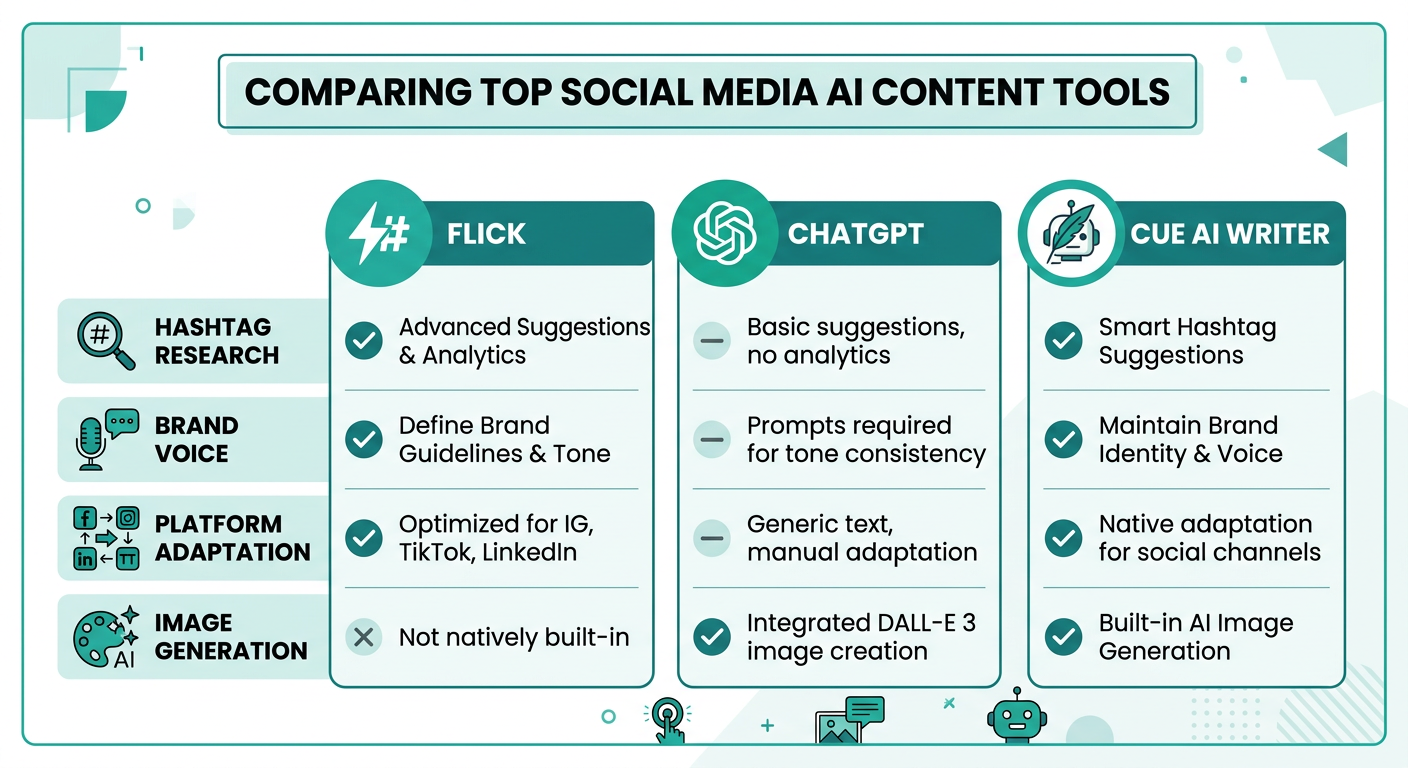
Dedicated AI writing tools for social media include Flick, which specializes in hashtag research, caption writing, and content calendar ideation — particularly popular among Instagram creators. ChatGPT remains a versatile all-rounder for generating platform-specific post variations, but it requires manual publishing workflows.
Built-in AI assistants within management platforms are increasingly the smarter choice because they keep creation and publishing in a single workflow. Cue's AI Writer, for example, adapts tone and character limits per platform automatically, so a LinkedIn post doesn't accidentally read like a tweet. The platform also supports brand voice customization — you teach the AI your specific tone, audience, and goals once, and every generated post reflects that consistently. AI image generation is also included on paid plans, eliminating the need for a separate design tool for basic visual content. For more ideas on maximizing your content output with AI-assisted tools, see our guide on How to Create Engaging Social Media Content.
Social Media Analytics and Reporting Tools
Publishing consistently is only half the equation — understanding what's actually working is what separates growing accounts from stagnant ones. Social media analytics tools range from platform-native insights (free but siloed) to sophisticated cross-platform dashboards with competitive benchmarking.
Sprout Social and Socialinsider are the gold standard for analytics depth, offering competitor comparisons, historical trend analysis, and custom report exports. Sprout's Listening feature pulls brand mentions across the open web, not just your own posts. Iconosquare is a specialist option focused specifically on Instagram and TikTok analytics, with engagement rate benchmarking against industry averages — invaluable for creators who want to know if their 3.2% engagement rate is above or below par for their niche.
Metricool offers a compelling free tier that includes basic analytics for up to one profile per network, making it accessible for solopreneurs. For teams already using an all-in-one platform, built-in analytics dashboards like those in Cue (available on Growth plans and above) track likes, comments, reposts, and impressions in one view — removing the need for a separate analytics subscription when you're starting out. Always pair your analytics review with knowledge of Best Times to Post on Social Media in 2026 to contextualize your engagement data.
Content Scheduling and Automation Tools
Content scheduling is the core use case that most people reach for a social media tool to solve first. The best scheduling tools go beyond a simple calendar — they offer queue-based publishing, smart timing recommendations, bulk upload, and platform-specific formatting.
Later pioneered the visual content calendar for Instagram and remains a top choice for image-heavy brands that plan feeds aesthetically before publishing. Its Link in Bio feature and first-comment scheduling are Instagram-specific additions that visual creators value highly. SocialPilot targets agencies with white-label reporting and bulk scheduling for up to 50 accounts per workspace.
Cue takes a smart-scheduling approach: rather than simply letting you pick a time, the platform analyzes engagement patterns for each connected platform and recommends optimal publish windows — so your X post goes out at 9 AM peak morning and your LinkedIn update hits at 2:15 PM workday prime automatically. For teams that want to go further with automation, Zapier connects most scheduling tools to thousands of other apps, enabling workflows like auto-scheduling new RSS content, triggering Slack notifications when posts go live, or syncing published content logs to a Google Sheet. Cue also offers direct API access on Growth plans, enabling custom automation pipelines without a middleware layer.
Social Media Monitoring and Listening Tools
Scheduling and analytics tell you what you published and how it performed. Social listening tools tell you what the internet is saying about you, your competitors, and your industry — even when you're not tagged.
Brandwatch is the enterprise leader in social intelligence, processing hundreds of millions of data points daily across social platforms, news sites, blogs, and forums. It's built for large brands tracking global sentiment and competitive positioning. Mention provides a more accessible entry point, with real-time alerts for brand mentions, keyword tracking, and competitor monitoring starting at significantly lower price points than Brandwatch.
BuzzSumo approaches listening from a content discovery angle — it surfaces the highest-performing content in any niche, identifies the influencers amplifying it, and tracks how specific topics trend over time. This makes it particularly valuable for content strategy teams who want to align their publishing calendar with what audiences are actively engaging with. For social media managers who want to understand algorithm shifts and trending formats before their competitors do, combining a listening tool like Mention with a scheduling platform that supports rapid publishing across multiple platforms gives you both the intelligence and the execution speed to capitalize on trends quickly.
Free vs. Paid Social Media Marketing Tools
One of the most common questions we hear is whether free social media tools are genuinely usable or just stripped-down bait for upgrades. The honest answer: it depends entirely on your volume and feature needs.
Here's a practical comparison of what free tiers actually offer in 2026:
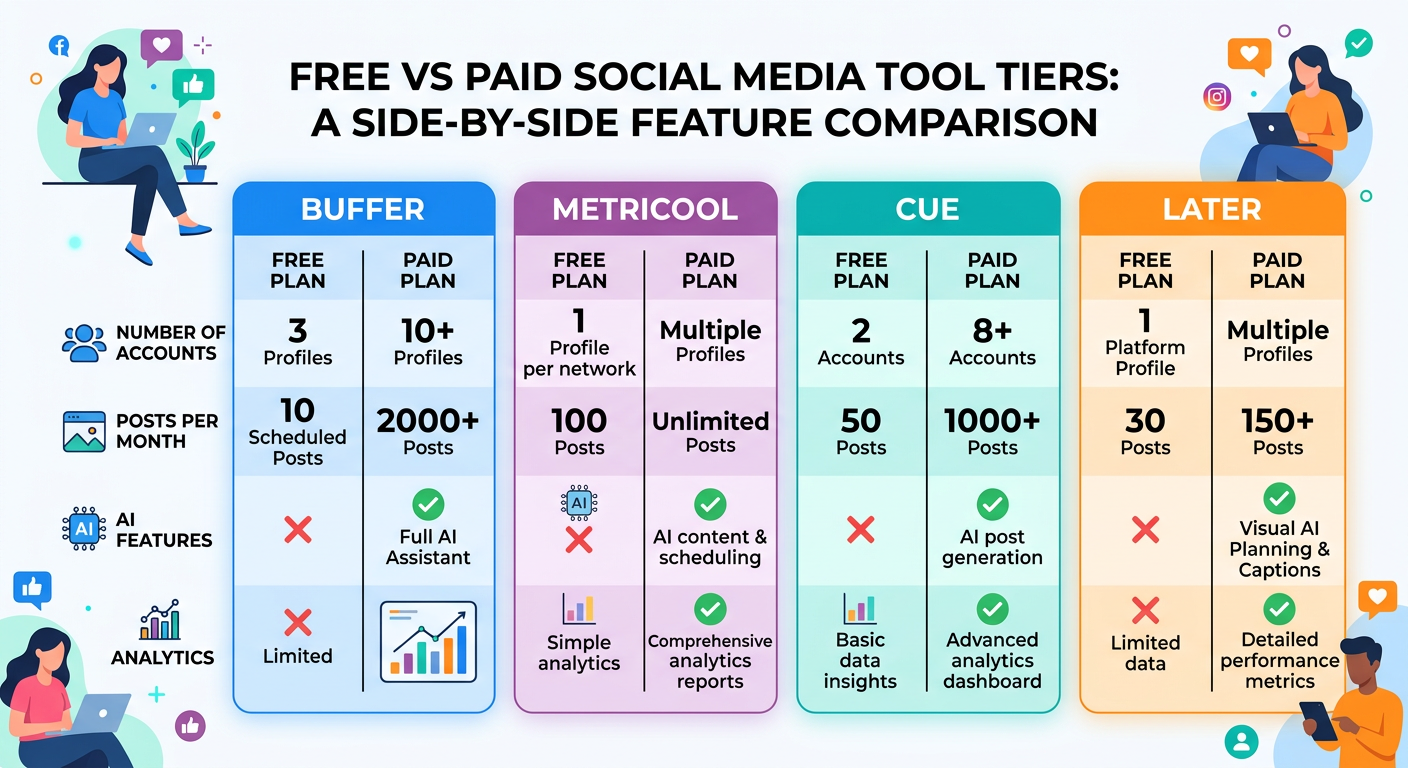
- Buffer Free: 3 channels, 10 scheduled posts per channel, basic analytics
- Metricool Free: 1 profile per network, 50 scheduled posts, basic analytics
- Canva Free: Design tool with social media templates, limited brand kit features
- Cue Starter (Free): 2 social accounts, 15 posts per month, basic scheduling, email support
- Hootsuite Free: Discontinued — now starts at $99/month
- Later Free: 1 social set, 5 posts per social profile per month
For solopreneurs just getting started, Buffer or Cue's free tiers are genuinely functional for maintaining a basic presence across multiple platforms. The moment you need more than 2–3 accounts, more than 30–50 posts per month, AI assistance, or analytics beyond 7-day windows, paid plans become necessary. Cue's Growth plan at $15/month (billed yearly) is among the most competitive paid entry points in the market, covering 15 accounts, 150 posts, 500 AI credits, analytics, and API access in a single subscription. Enterprise teams using Sprout Social report spending $2,988+ annually but cite 40% time savings on reporting as justification for the investment.
Social Media Marketing Tools for Small Business
Small business owners face a unique set of constraints: limited time, limited budget, and often a single person wearing every marketing hat. The right tool for a small business prioritizes ease of use, cross-platform efficiency, and enough analytics to make informed decisions — without requiring a dedicated social media manager to operate.
For most small businesses, an all-in-one platform beats building a stack of specialized tools. Zoho Social integrates directly with Zoho CRM, making it an excellent choice for businesses that want social interactions tied to their customer records. Vista Social offers a surprisingly full feature set at budget pricing, including review management and link in bio pages. Cue is well-suited for small business owners who want AI-assisted content creation alongside scheduling — particularly useful when the business owner isn't a natural content writer. The brand voice feature means you configure your tone once and AI generates on-brand posts consistently without ongoing manual editing.
For businesses that primarily use Instagram, the native Meta Business Suite (formerly Creator Studio) remains a solid free option for scheduling feed posts, Reels, and Stories — though it offers no cross-platform capability. Combining Meta Business Suite for Instagram/Facebook with a tool like Cue for other platforms is a cost-effective approach for businesses on tight budgets. You can also learn to stretch your content further by reading our guide on repurposing content across platforms.

How to Choose the Right Tool for Your Workflow
With dozens of tools competing for your subscription budget, the selection process can feel paralyzing. A practical framework cuts through the noise: start with your constraints, not the feature lists.
Step 1 — Count your platforms and accounts. If you're managing more than 3 platforms, you need a multi-platform scheduler. Native tools won't scale.
Step 2 — Estimate your monthly post volume. Under 30 posts per month? Free tiers may suffice. Over 100 posts? Budget for a paid plan with unlimited or high-volume scheduling.
Step 3 — Identify your biggest time drain. If it's writing, prioritize AI content tools. If it's reporting, prioritize analytics depth. If it's simply remembering to post, prioritize scheduling reliability.
Step 4 — Check platform-specific requirements. Instagram requires a Business or Creator account for API-based scheduling. Facebook scheduling works for Pages only. Some tools don't support TikTok or Mastodon — verify before committing.
Step 5 — Start free, upgrade based on pain. Most quality tools offer free trials or free tiers. Use them until you hit a wall, then upgrade to the plan that removes that specific friction. For teams ready to consolidate their stack into one efficient platform, Cue offers a free plan with no credit card required — a low-risk starting point for creators and small businesses looking to grow smarter across every platform.
Integrating Social Media Tools with Your Marketing Stack
The best social media tool doesn't exist in isolation — it needs to integrate seamlessly with the rest of your marketing stack. Whether you're using CRM software, email marketing platforms, or analytics dashboards, choosing a tool with strong integration capabilities saves hours of manual data entry and ensures your social media strategy aligns with broader business objectives.
Platforms like Cue offer native integrations with popular marketing tools through their API, allowing you to sync customer data, trigger campaigns based on social engagement, and feed social metrics into your central reporting dashboard. Zapier acts as a universal connector, enabling integration between social media management tools and thousands of other business applications — from project management software like Asana and Monday.com to analytics platforms like Google Analytics 4. Small businesses using multiple marketing tools should prioritize platforms with pre-built integrations to CRM systems, email tools, and reporting software; this reduces setup complexity and ensures data flows accurately across your entire marketing operation. When evaluating social media management software, ask whether the platform supports the specific tools you're already using — integration compatibility can be just as important as native feature depth.
Frequently Asked Questions
What are the best free social media marketing tools?
Buffer's free plan (3 channels, 10 posts per channel), Cue's Starter plan (2 accounts, 15 posts/month), and Metricool's free tier (1 profile per network, 50 scheduled posts) are among the most functional free options in 2026. Meta Business Suite is also free and works well for businesses focused solely on Instagram and Facebook.
Which social media tool is best for small businesses?
For small businesses wanting an all-in-one solution, Cue, Zoho Social, and Vista Social offer the best balance of affordability and features. Zoho Social is ideal if you already use Zoho CRM, while Cue's AI writing assistant is particularly useful for business owners who aren't natural content writers.
How do social media management tools handle algorithm changes?
The best platforms update their smart scheduling recommendations and platform integrations as social networks release API changes. Tools like Cue analyze real-time engagement patterns per platform, so optimal posting time recommendations adjust automatically as platform algorithms evolve.
What is the ROI of using a social media scheduling tool?
Research from Sprout Social indicates that marketing teams spend over 6 hours per week on manual social media scheduling and reporting. A scheduling tool that reclaims even half of that time represents 150+ hours saved annually — a significant ROI even for paid plans costing $15–$39/month.
Do social media tools support all platforms including TikTok and Mastodon?
Support varies widely by tool. Cue supports 8 platforms including Twitter/X, Bluesky, Instagram, Threads, LinkedIn, Facebook, Mastodon, and TikTok. Hootsuite supports 35+ networks. Always verify specific platform support before subscribing, especially for newer platforms like Bluesky or Threads.
How much should a small business budget for social media marketing tools?
Small businesses can start free with Buffer or Cue's free tiers and scale to $15–$39/month as they grow. Mid-sized businesses typically budget $50–$150/month for multi-platform tools with analytics, while enterprises like Sprout Social start at $249/month or higher based on team size and feature requirements.
Let Cue handle the scheduling
AI picks the best times for your audience and auto-publishes across every platform.