
Learn how to repurpose content across platforms with this step-by-step guide. Save time, reach more people, and get more from every piece you create.
How to Repurpose Content: A Step-by-Step Guide
Repurposing content means transforming one piece of content into multiple formats for different platforms — so you create once and publish everywhere. This guide walks you through a practical, repeatable workflow to multiply your reach without burning out.
Table of Contents
- Why Content Repurposing Is Worth Your Time
- Step 1: Audit Your Existing Content Library
- Step 2: Identify Your Highest-Value Content
- Step 3: Match Content Formats to Each Platform
- Step 4: Transform Your Content Into New Formats
- Step 5: Use AI Tools to Speed Up the Process
- Step 6: Schedule and Distribute Across Platforms
- Step 7: Measure Performance and Refine Your Strategy
- Step 8: Refresh Evergreen Content on a Regular Cycle
- Common Mistakes to Avoid When Repurposing Content
Why Content Repurposing Is Worth Your Time
Most creators and marketers are sitting on a goldmine they haven’t fully mined yet. Every blog post, podcast episode, webinar, or video you’ve already produced contains enough raw material to fuel weeks of social media content — if you know how to extract it.
Content repurposing is the practice of transforming existing content into new formats for different platforms and audiences. Instead of starting from scratch every time, you remix, reformat, and redistribute what already works.
The numbers make a compelling case: according to HubSpot, marketers who repurpose content are 3x more likely to report strong ROI compared to those who don’t. And according to Semrush’s State of Content Marketing report, 46% of marketers say updating and repurposing existing content is one of their most effective content strategies.
Beyond ROI, repurposing solves a very real problem: consistency. Showing up consistently on multiple platforms is one of the hardest parts of growing an audience. Repurposing gives you a sustainable system to do it without doubling your workload.
This guide walks you through a practical, step-by-step workflow to start repurposing content today — including how to pick the right formats, use AI to speed things up, and measure what’s actually working.
Step 1: Audit Your Existing Content Library
Before you can repurpose anything, you need to know what you have. Set aside 30–60 minutes to conduct a simple content audit.
Create a spreadsheet (Google Sheets or Airtable work well) and list every major piece of content you’ve published: blog posts, YouTube videos, podcast episodes, webinars, newsletters, and Twitter/X threads. For each item, note the format, the topic, the publish date, and any available performance data (page views, engagement, downloads).
As you build your inventory, tag each item by content pillar — the core themes your brand covers. For example, a social media management brand might use pillars like “Scheduling”, “Content Strategy”, “Platform Guides”, and “Productivity.”
This audit serves two purposes. First, it surfaces content you may have forgotten about. Second, it lets you spot patterns — which topics consistently performed well and which formats your audience already trusts. That’s the data that will guide your repurposing decisions in the next step.
Actionable tip: Add a “Repurpose status” column to your spreadsheet with values like: Not started, In progress, Done. This keeps your repurposing pipeline visible at a glance.
Step 2: Identify Your Highest-Value Content
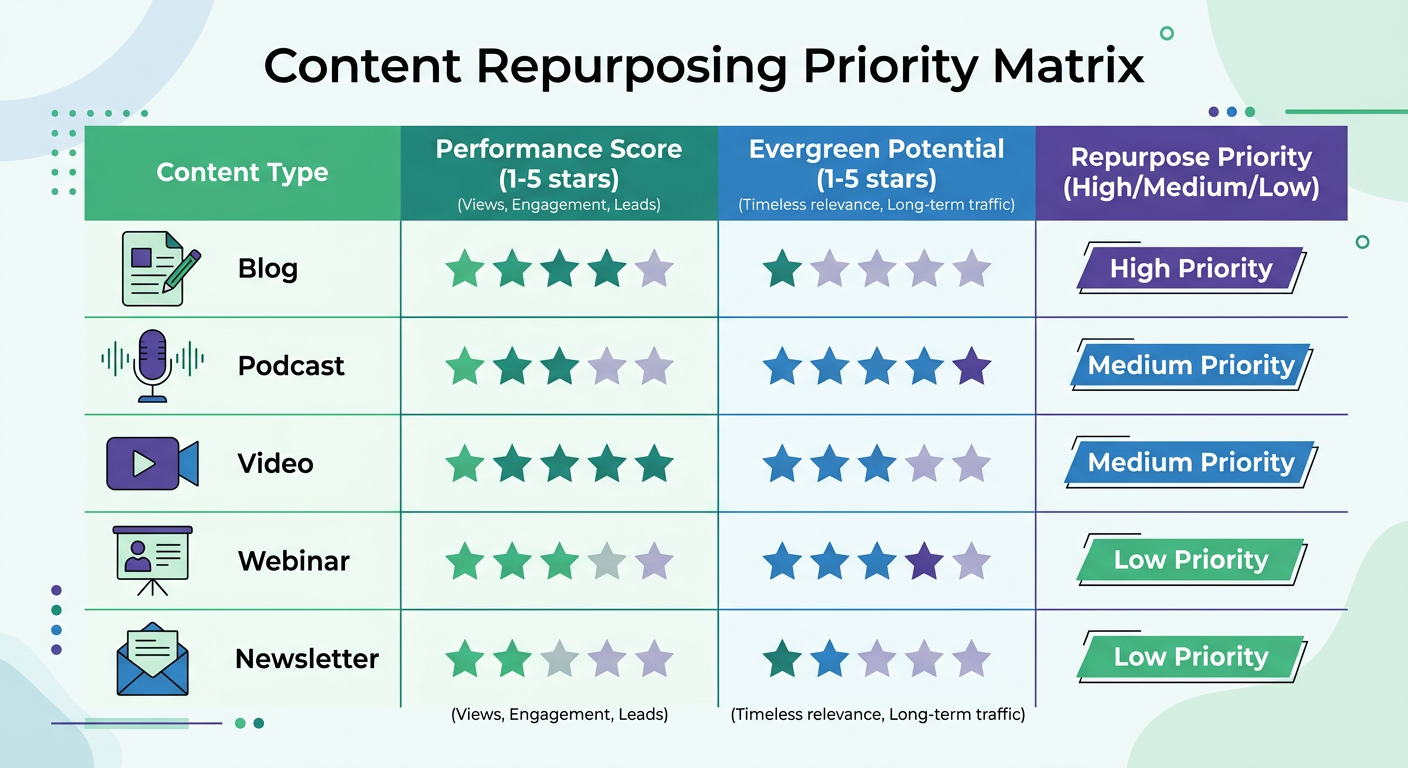
Not all content is worth repurposing equally. Focus your energy on two categories: your best performers and your evergreen content.
Best performers are pieces that already proved they resonate — a blog post that still drives consistent traffic, a podcast episode with unusually high downloads, or a LinkedIn post that went viral. These already have validated audience interest, so repurposing them is a lower-risk bet.
Evergreen content refers to topics that stay relevant regardless of when someone reads or watches them. A guide on “how to write better social media captions” will be just as useful in 18 months as it is today. Prioritize evergreen pieces for repurposing because they’ll continue generating value long after you distribute them.
A practical framework: score each content piece from 1–5 on two axes — performance (views, engagement, conversions) and evergreen potential (how long will this topic stay relevant?). Anything scoring 4+ on both axes goes to the top of your repurposing queue.
Avoid repurposing highly time-sensitive or news-driven content unless you plan to update it with fresh data first.
Step 3: Match Content Formats to Each Platform
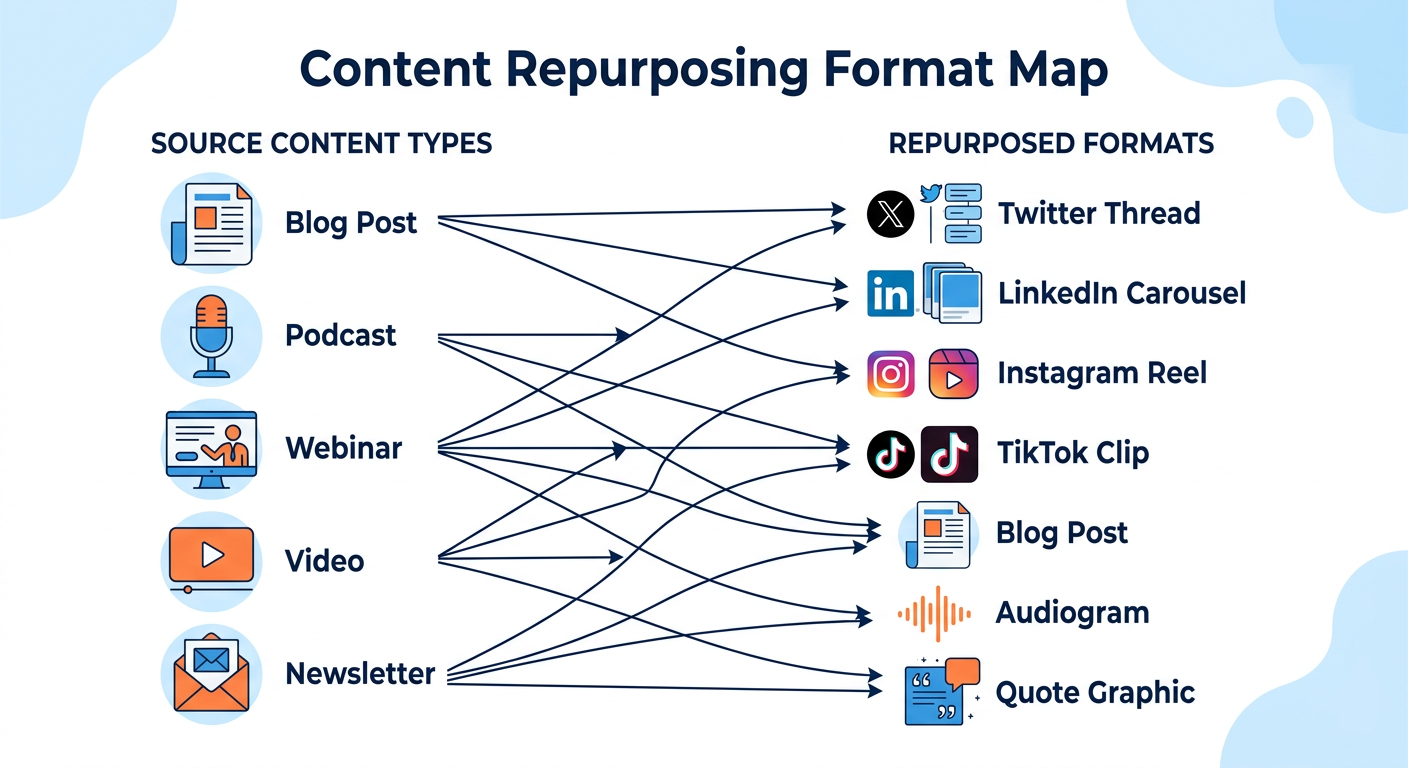
One of the most important — and most commonly skipped — steps in content repurposing is understanding that each platform has its own native format. Blindly copy-pasting the same content everywhere signals laziness to both algorithms and audiences.
Here’s a practical format matching guide:
| Source Content | Platform | Best Repurposed Format |
|---|---|---|
| Blog post | Twitter/X | Thread (key points as tweets) |
| Blog post | Long-form post or carousel | |
| Blog post | Carousel or quote graphics | |
| Blog post | Bluesky/Threads | Conversational short posts |
| Podcast episode | YouTube | Audiogram or clip highlight |
| Podcast episode | Blog | Edited transcript + summary |
| Webinar | TikTok/Reels | 30–60 second tip clips |
| Video (long-form) | Native video clip (under 3 min) | |
| Newsletter | Key stat or quote graphic |
For emerging platforms like Bluesky and Threads, the sweet spot is conversational, opinion-driven content — think: the insight behind the blog post rather than the full post itself. On LinkedIn, data-driven carousels and “lessons learned” posts consistently outperform plain text.
TikTok and Instagram Reels reward strong hooks in the first 1–2 seconds. When repurposing video content for short-form, always lead with the most provocative or surprising point, not the setup.
Step 4: Transform Your Content Into New Formats
This is where the actual work happens — but it’s less labor-intensive than most people expect once you have a process.
Blog post → Social thread: Pull the 5–7 most actionable points from a blog post. Each point becomes a tweet or Bluesky post. The first post is your hook (a bold claim or surprising stat), the last is your CTA (link to the full post).
Blog post → LinkedIn carousel: Choose a listicle-style post. Each list item becomes one carousel slide. Slide 1 is the title and hook, the final slide is a CTA. Tools like Canva make this fast with pre-built carousel templates.
Podcast/webinar → Short video clips: Tools like Opus Clip and VEED.io use AI to automatically identify the most engaging 30–90 second clips from long-form video or audio. These clips are ready for Reels, TikTok, and YouTube Shorts with minimal editing.
Video → Blog post: Transcribe the video using a tool like Otter.ai or Descript, then edit the transcript into a structured article. Add headers, bullet points, and a summary. This is one of the highest-ROI repurposing moves for SEO — you’re essentially creating a new indexable page with content that already proved its value.
Newsletter → Twitter/X thread: Your newsletter’s main argument or insight becomes the thread spine. Each paragraph or section becomes a separate post.
Batch your transformations: pick one source piece and produce all its repurposed variants in a single work session before moving to the next. This approach reduces context-switching and can cut your total repurposing time by up to 40%.
Step 5: Use AI Tools to Speed Up the Process
AI has dramatically lowered the barrier to content repurposing. What used to take hours of manual reformatting can now take minutes — as long as you stay in the loop to preserve your brand voice.
Here are the most useful AI tools by repurposing task:
- Writing and rewriting: Tools like Jasper and Copy.ai can reformat a blog post into social captions, email subject lines, or ad copy in seconds. Feed them your source content and specify the format and platform tone.
- Video clip extraction: Opus Clip analyzes long-form video and scores clips by virality potential. Pictory.ai converts blog posts or scripts into short videos automatically.
- Podcast repurposing: Recast Studio and Headliner convert podcast audio into audiograms, transcripts, and social clips.
- Image creation: Canva’s Magic Write and AI image generators can produce on-brand graphics from your text content in minutes.
We built Cue’s AI content assistant specifically to help creators maintain a consistent brand voice while repurposing across platforms. You can define your tone, audience, and goals once — and the AI adapts your content for each platform automatically, so your Bluesky post doesn’t read like a copy-pasted LinkedIn article.
Important caveat: Always review AI-generated repurposed content before publishing. AI tools are excellent at speed and structure, but they can miss nuance, flatten your personality, or generate inaccurate claims. Use AI as a first draft engine, not a replacement for your editorial judgment.

Step 6: Schedule and Distribute Across Platforms
Creating repurposed content is only half the equation. Getting it out consistently — at the right times, on the right platforms — is where most people drop the ball.
The key is to build a distribution queue rather than publishing reactively. Once you’ve produced a batch of repurposed variants from a single source piece, load them into a scheduling tool and stagger their publication across days or weeks. This prevents content flooding (posting everything at once) and keeps your channels consistently active.
For timing, data matters. According to our research, the best posting times vary significantly by platform — LinkedIn peaks on Tuesday through Thursday mornings, while Instagram and TikTok tend to see higher engagement in the evenings. Using a tool that auto-schedules based on your audience’s actual engagement patterns removes the guesswork entirely.
With Cue, you can write one post and publish it to multiple platforms simultaneously — each version adapted for that platform’s format and character limits. The schedule queue lets you line up an entire week’s worth of repurposed content in one sitting, then step away and let it run automatically.
A practical workflow: every Monday, spend 60–90 minutes loading the week’s repurposed content into your scheduling queue. By Wednesday, you’ll have a full week of posts ready to go across all your platforms — with zero day-of effort required.
Step 7: Measure Performance and Refine Your Strategy
Content repurposing without measurement is just guessing. To build a genuinely effective repurposing strategy, you need to track what each repurposed variant actually does once it’s live.
The core metrics to track by platform:
- Twitter/X threads: Impressions, link clicks, profile visits, replies
- LinkedIn carousels: Reach, saves, comments, follower growth
- Instagram Reels: Plays, shares, saves, reach from non-followers
- Blog posts (from repurposed transcripts): Organic traffic, time on page, backlinks
- TikTok clips: Views, completion rate, shares
After 30 days, compare the performance of repurposed content against your original pieces. Ask: Which platform generated the most engagement for this topic? Which format had the best reach-to-engagement ratio? Did the repurposed blog transcript rank for any new search terms?
This data directly informs your next repurposing decisions. If LinkedIn carousels consistently outperform threads for your audience, you shift more of your repurposing effort there. If short video clips from webinars are driving newsletter sign-ups, you invest in more webinar production.
Use this framework to track ROI: for each source piece, sum up the total reach across all repurposed variants and compare it to the reach of the original. Most creators find that repurposed content collectively generates 3–5x the reach of the original piece alone — making the investment in a repurposing workflow one of the highest-leverage activities in any content strategy. Check out our guide on creating engaging social media content for additional tactics to improve performance across all formats.
Step 8: Refresh Evergreen Content on a Regular Cycle
Repurposing isn’t a one-time event — it’s an ongoing system. The most effective content marketers treat their best-performing content as assets that need periodic refreshing, not archives that collect dust.
Set a recurring calendar reminder every 6–12 months to revisit your top-performing pieces. For each one, ask:
- Are the statistics and data points still current?
- Has the platform landscape changed in a way that affects the advice?
- Are there new examples, tools, or case studies worth adding?
- Could this content reach a new audience segment if reformatted?
When you refresh a piece — updating stats, adding new sections, or improving clarity — you can re-enter the entire repurposing cycle: new social threads, new carousels, new video clips. Your audience has likely grown since the last time you distributed this content, so many of your new followers will be encountering it for the first time.
For SEO, refreshing and republishing updated blog content has been shown to boost organic traffic by an average of 106% according to HubSpot’s research on content updates. The same principle applies to social: re-sharing a significantly improved post often outperforms the original distribution.
By the time you complete this full cycle — audit, identify, format-match, transform, use AI, schedule, measure, and refresh — you’ll have built a content repurposing engine that runs on a fraction of the creative energy of starting from scratch every week. That’s the real payoff: more reach, more consistency, and more time to focus on the ideas that only you can create.
Common Mistakes to Avoid When Repurposing Content
Even with a solid repurposing strategy, creators often stumble on execution. Understanding the most common pitfalls helps you avoid them and maximize your results.
Mistake #1: Cross-posting without adaptation. Simply copying your blog post text and pasting it into LinkedIn or Twitter defeats the entire purpose of repurposing. Each platform has different audience expectations, character limits, and native formats. A Twitter thread needs hooks and short, punchy language. A LinkedIn post needs professional framing. When you skip the adaptation step, engagement typically drops by 70–80% compared to properly formatted repurposed content. Always localize your content for the platform.
Mistake #2: Choosing the wrong content to repurpose. Not every piece deserves repurposing effort. Repurposing content that underperformed initially won’t magically make it succeed in a new format. Focus your energy on your top 20% of content — the posts, videos, and podcasts that already proved resonance with your audience. Data-driven selection prevents wasted effort.
Mistake #3: Ignoring platform-specific trends. By the time you repurpose a blog post written 6 months ago into a TikTok, platform trends may have shifted entirely. Video hooks that worked last quarter might feel stale this quarter. Check platform trends before you repurpose older content and adjust your approach accordingly.
Mistake #4: Over-relying on AI without brand voice review. AI tools can generate repurposed content 10x faster than manual work, but they often flatten personality and miss nuance. Always review and customize AI outputs before publishing. Your unique voice is your competitive advantage — don’t let it get lost in automation.
Mistake #5: Not setting up a measurement system. If you don’t track performance, you’re flying blind. Set up your analytics dashboards before you start heavy repurposing so you can identify what works and double down on it. Without data, you can’t optimize your repurposing workflow.
Frequently Asked Questions
What does it mean to repurpose content?
Repurposing content means taking an existing piece of content — like a blog post, podcast, or video — and transforming it into a new format for a different platform or audience. For example, turning a blog post into a LinkedIn carousel or a webinar into short TikTok clips. This approach maximizes the value of content by reaching new audiences in their preferred formats.
How often should I repurpose content?
A good rule of thumb is to repurpose every high-performing or evergreen piece of content at least 3–5 times across different formats and platforms. Revisit your best content every 6–12 months for a refresh cycle to keep it current and redistribute it to your growing audience. This ensures your top-performing content continues to generate returns long after initial publication.
What’s the difference between repurposing and cross-posting content?
Cross-posting means sharing the same content as-is on multiple platforms. Repurposing means transforming the content into a native format suited to each platform — a blog post becomes a thread, a video becomes a clip, a podcast becomes a blog post. Repurposing performs significantly better because it respects each platform’s culture and algorithm, typically generating 70–80% higher engagement than cross-posted content.
What are the best tools for repurposing content automatically?
Top tools include Opus Clip and Pictory.ai for video-to-clip extraction, Recast Studio and Headliner for podcast repurposing, Jasper and Copy.ai for text reformatting, and Canva for visual content. For scheduling repurposed content across platforms automatically, Cue handles multi-platform publishing from a single dashboard.
Does repurposing content hurt SEO?
Not if done correctly. Repurposing a blog post into social content, video, or a podcast episode doesn’t create duplicate content issues because the formats are different. If you’re repurposing text-based content across multiple web pages, use canonical tags or significantly rewrite the content to avoid duplicate content penalties.
How can I measure the ROI of my content repurposing efforts?
Track platform-specific metrics for 30 days after publishing repurposed content: impressions, clicks, saves, shares, and conversions. Then compare total reach across all repurposed variants against the original piece. Most creators find repurposed content collectively generates 3–5x the reach of the original, making it one of the highest-ROI content marketing activities.
Let Cue handle the scheduling
AI picks the best times for your audience and auto-publishes across every platform.