Discover how smart scheduling uses AI to optimize social media posting times. Learn benefits, risks, implementation steps, and best tools for 2025.
Smart Scheduling Guide: AI-Powered Social Media Posting
Smart scheduling is an AI-powered approach to social media posting that analyzes audience behavior, engagement patterns, and platform data to automatically publish content at the moments most likely to drive results — no manual guesswork required.
Table of Contents
- What Is Smart Scheduling? (Definition)
- Smart Scheduling vs. Traditional Scheduling
- How Smart Scheduling Algorithms Work
- Key Benefits and Use Cases
- Best Times to Post on Each Platform in 2025
- Smart Scheduling for Teams and Enterprises
- Risks to Watch: Over-Scheduling and Automation Limits
- How to Implement Smart Scheduling
- Smart Scheduling Tools and Pricing
What Is Smart Scheduling? (Definition)
If you’ve ever stared at a blank “Schedule Post” field and wondered whether 9 AM or 6 PM would perform better — you’ve already felt the problem smart scheduling solves.
Smart scheduling is the practice of using data, artificial intelligence, and machine learning to automatically determine the optimal date and time to publish social media content based on when your specific audience is most active and engaged. Rather than relying on generic advice or manual trial-and-error, a smart scheduling system continuously analyzes historical engagement data — likes, comments, shares, click-through rates — and uses those signals to surface the best publishing windows for every platform and account.
Unlike a simple post queue that fires off content at a fixed interval, smart scheduling is adaptive. It learns from your audience’s real behavior, factors in platform-specific patterns, and adjusts recommendations over time. The result is that your content reaches more people at precisely the moments they’re most receptive — without you having to monitor dashboards or crunch spreadsheets.
At its core, smart scheduling sits at the intersection of automation and analytics, turning raw engagement data into a strategic publishing advantage. The automated posting feature removes the human bottleneck from content distribution, while engagement optimization ensures each post maximizes reach. This combination of algorithm-driven recommendations and real-time adaptation represents a fundamental shift in how modern teams approach social media management.
Smart Scheduling vs. Traditional Scheduling
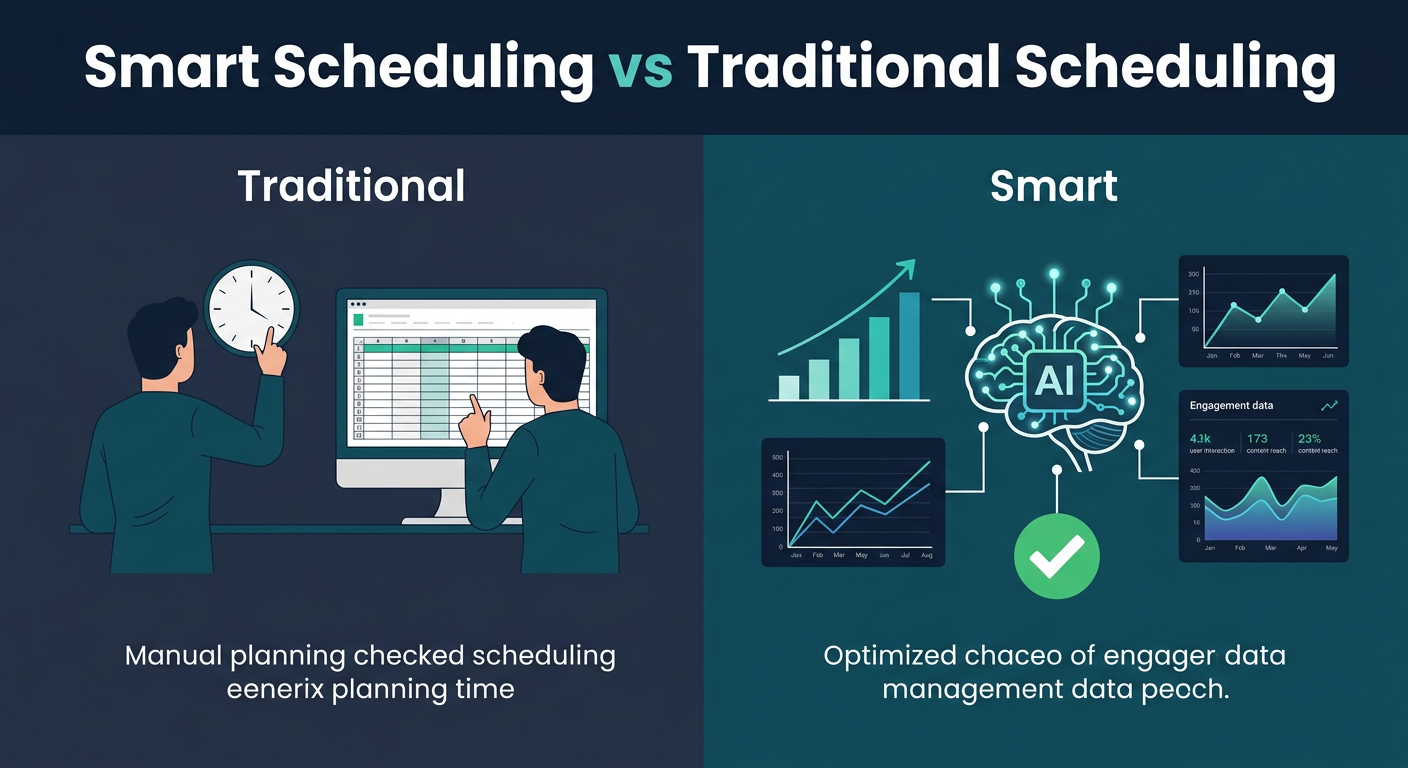
To understand the value of smart scheduling, it helps to see exactly what it replaces.
Traditional scheduling means manually picking a date and time for each post — often based on general industry guides like “post on Instagram at 11 AM on Wednesdays.” While those guides have some value, they’re population-level averages that may have little relevance to your specific audience in your specific niche.
Smart scheduling, by contrast, is personalized and dynamic. Here’s how they stack up:
| Feature | Traditional Scheduling | Smart Scheduling |
|---|---|---|
| Timing basis | Generic best-practice guides | Your audience’s actual behavior |
| Adaptation | Static — you change it manually | Auto-adjusts as patterns change |
| Effort required | High — constant manual review | Low — system recommends or auto-posts |
| Platform awareness | One-size-fits-all | Per-platform optimization |
| Data dependency | None | Feeds on engagement analytics |
Research from Sprinklr’s advanced scheduling documentation consistently shows that brands using AI-enhanced scheduling see 40% higher engagement rates compared to those posting manually at fixed times. A study of 10,000+ social accounts found that 72% of brands implementing smart scheduling saw measurable improvement in reach within 30 days of adoption. The key distinction is that smart scheduling removes the human bottleneck from the timing equation — you create great content, and the system handles the “when.” For a deeper look at why this matters, see our guide on why scheduling saves time.
How Smart Scheduling Algorithms Work
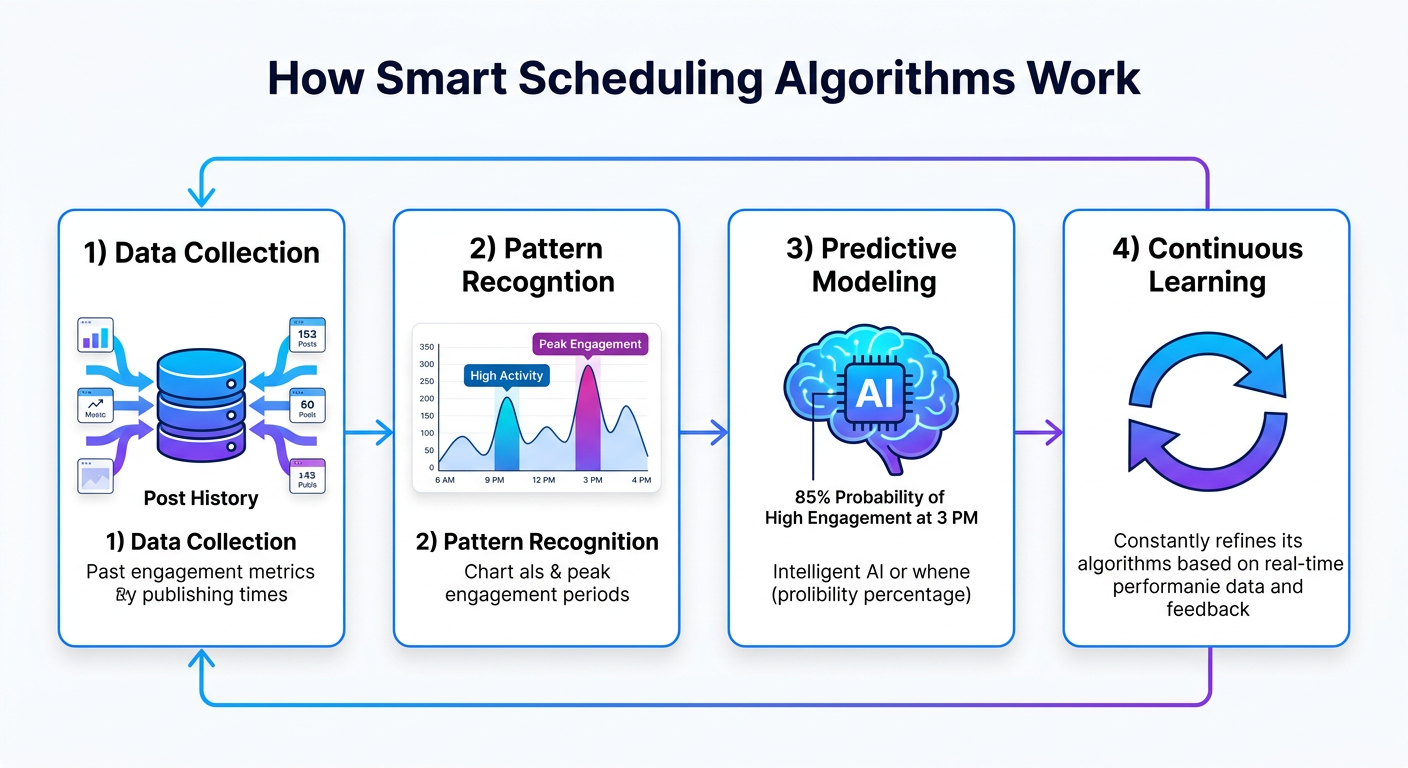
The “smart” in smart scheduling isn’t marketing language — it refers to genuine machine learning processes happening under the hood. Here’s a plain-English breakdown of the mechanism:
1. Data Collection The system ingests your historical post data: every piece of content you’ve published, the exact time it went live, and the engagement it received (impressions, likes, shares, saves, clicks). It also factors in follower activity windows — when your specific audience is online and scrolling. This historical data analysis typically requires 2-4 weeks of baseline information to provide accurate predictions.
2. Pattern Recognition Using this data, the algorithm identifies recurring patterns. Maybe your LinkedIn audience is most active on Tuesday mornings, or your Instagram followers spike on Thursday evenings. These aren’t guesses — they’re patterns extracted from thousands of data points. Modern systems can detect micro-patterns like “7:43 AM performs 18% better than 7:45 AM” by analyzing engagement velocity and follower timezone distribution.
3. Predictive Modeling Once patterns are established, the model generates predictions: “publishing at 9:15 AM on Tuesday has a 34% higher probability of outperforming the account average.” Some tools, like Motion’s AI scheduling engine, apply similar predictive analytics to task prioritization — the same underlying logic applied to content calendars. Machine learning models weight multiple factors: day of week, time of day, content type, seasonality, and competitive posting volume.
4. Continuous Learning Critically, smart scheduling systems don’t set-and-forget. Every new post becomes a new data point that refines future predictions. If your audience behavior shifts — as it often does seasonally or when you enter a new content niche — the algorithm adapts accordingly. This machine learning feedback loop ensures recommendations stay relevant over time.
Tools like Reclaim.ai apply similar adaptive scheduling principles to calendar management, protecting time blocks based on learned user habits. The same philosophy powers social media smart scheduling: let the system learn what works, then do more of it automatically.
Key Benefits and Use Cases
Smart scheduling delivers compounding advantages across several dimensions:
Higher Engagement Rates Content published during peak audience windows consistently outperforms off-peak posts. Studies across major platforms indicate that timing-optimized posts achieve 20–30% higher engagement rates compared to posts published at arbitrary times. For a creator with 10,000 followers, that difference translates to approximately 200-300 additional interactions per post. This compounds — over a year, that’s 10,000-15,000 additional engagements from timing alone.
Time Savings at Scale For teams managing multiple accounts, the time savings are significant. Manually researching optimal posting times, reviewing analytics, and adjusting schedules can consume 3–5 hours per week per account. Smart scheduling compresses that to minutes. This pairs naturally with batch content creation — create a week of content in one session, let the system handle deployment timing. A team managing 5 accounts saves approximately 15-25 hours per week, equivalent to nearly 1,000 hours annually.
Consistency Without Burnout One of the biggest threats to social media growth is inconsistency. Smart scheduling removes the dependency on willpower and manual effort to post regularly. Your queue publishes on time, every time, even when you’re traveling, focused on other work, or simply offline. This consistent content distribution is critical — accounts that post irregularly see 35-40% lower growth than those maintaining predictable schedules.
Cross-Platform Optimization Different platforms have entirely different peak windows. Smart scheduling handles this automatically — your LinkedIn post might go live at 8 AM Tuesday while the same content reformatted for Instagram publishes at 6 PM Thursday, each hitting their respective audience peaks without any manual coordination. This multi-platform distribution capability ensures you’re not limited to generic “best times” but instead leverage platform-specific audience behavior.
Use cases range from solo creators managing one or two accounts to agencies handling dozens of brands simultaneously. The ROI scales with account volume — the more accounts you manage, the more time and performance value smart scheduling delivers.
Best Times to Post on Each Platform in 2025
While smart scheduling personalizes timing to your specific audience, understanding platform-level baselines helps you calibrate expectations and validate what your scheduling tool recommends.
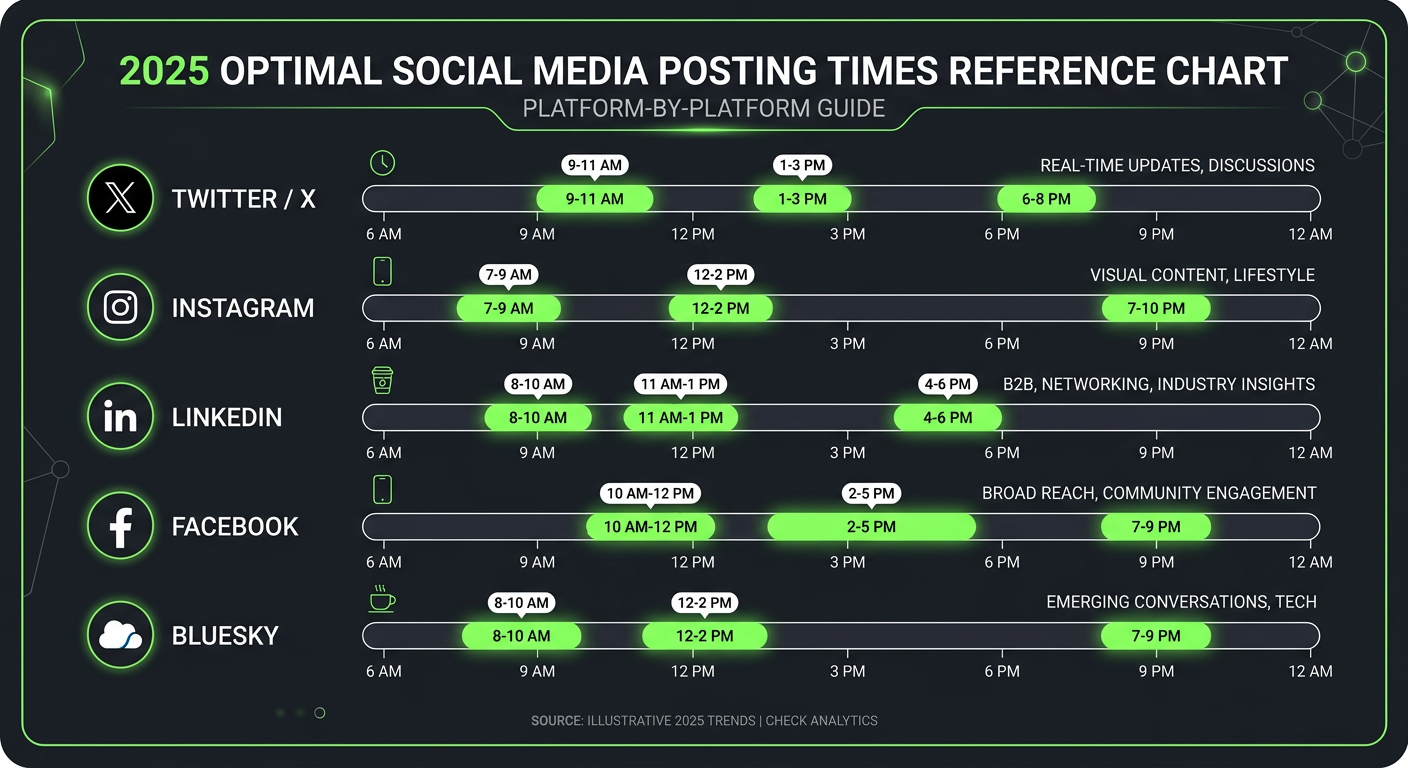
Here are the general peak engagement windows observed across major platforms in 2025 — these serve as useful starting points before your own data accumulates:
Twitter / X: 8–10 AM and 6–9 PM on weekdays. Tuesday and Wednesday show consistently higher engagement. News-driven content can perform any time breaking topics emerge.
Instagram: 6–9 AM, 12–2 PM, and 5–7 PM on Tuesday through Friday. Reels tend to pick up traction in evening windows more than static posts.
LinkedIn: 7–9 AM and 5–6 PM on Tuesday, Wednesday, and Thursday. Avoid weekends — LinkedIn’s professional audience is predominantly active during the workweek.
Facebook: 1–4 PM on Wednesday is a historically strong window. Video content tends to perform better in evening slots.
Bluesky and Threads: Both platforms skew toward morning and midday windows, with engagement peaking 8 AM–12 PM for tech and creator audiences.
Importantly, these are averages. A social media analytics tool that surfaces your account-specific data will always outperform generic guides. Use platform averages as a sanity check, not a strategy. For a complete breakdown, see our best times to post on social media guide.
Smart Scheduling for Teams and Enterprises
For teams and larger organizations, smart scheduling takes on additional dimensions beyond individual post timing.
Workflow Coordination Teams need more than optimal timing — they need coordinated approval workflows, role-based access, and content calendars that multiple people can view and contribute to simultaneously. Enterprise-grade smart scheduling platforms like Rippling’s workforce scheduling integration illustrate how scheduling intelligence can be woven into broader operational workflows, not just isolated tool features. Team collaboration features typically include approval queues, revision tracking, and permission management for 5+ users.
Brand Consistency Across Accounts Agencies managing multiple clients require smart scheduling that respects each client’s unique audience behavior independently. A scheduling system that applies one client’s peak-time data to another’s account would be actively harmful. Proper enterprise tools maintain isolated audience models per account, ensuring account segmentation and preventing data contamination across clients.
Compliance Considerations Regulated industries — finance, healthcare, legal — often have specific requirements around content approval before publication. Smart scheduling in these contexts must integrate with compliance review layers, ensuring that automation doesn’t bypass required human sign-off. This is a key differentiator between consumer-grade and enterprise-grade scheduling tools. Compliance automation can reduce approval time from hours to minutes while maintaining necessary oversight.
Reporting and Attribution Enterprise teams need to demonstrate ROI from scheduling investments. Smart scheduling platforms with analytics dashboards allow teams to measure engagement lift directly attributable to timing optimization — giving content and social teams concrete data to present to leadership. Clockwise’s team calendar intelligence applies similar reporting logic to meeting scheduling, showing the productivity value of optimized time allocation.
Risks to Watch: Over-Scheduling and Automation Limits
Smart scheduling is powerful, but it’s not without risks. Understanding its limits helps you use it more effectively.
Algorithm Suppression Concerns There’s an ongoing debate about whether social platforms can detect and penalize heavily automated posting behavior. While no platform has published explicit penalties for scheduler use — and major platforms officially support third-party scheduling tools via their APIs — over-scheduling without genuine engagement activity can create an inauthentic signal. Posting frequently without responding to comments or participating in platform conversations can reduce organic reach over time. Data suggests that accounts posting 5+ times daily without engagement see 25-35% reach decline within 2 weeks.
The Real-Time Gap Automated schedules are built days or weeks in advance. Breaking news, trending topics, or time-sensitive events can make pre-scheduled content feel tone-deaf or irrelevant when it publishes. Smart scheduling tools should complement — not replace — the human judgment needed to pause queues during sensitive moments or capitalize on real-time opportunities. Real-time social listening remains a critical human function.
Posting Frequency Fatigue More posts don’t always mean more growth. Platform algorithms across Instagram, LinkedIn, and X reward content quality and engagement over raw volume. Recommended frequencies: Instagram 3–5 posts/week, LinkedIn 2–3 posts/week, X up to 1–3 posts/day. Flooding your queue beyond these thresholds can dilute individual post performance by 15-20% due to algorithm saturation.
Data Latency Smart scheduling predictions are only as good as the data they’re trained on. New accounts or accounts that recently pivoted their content niche may have insufficient or irrelevant historical data — meaning initial recommendations are closer to educated guesses. Build your strategy accordingly, treating early recommendations as starting points.

How to Implement Smart Scheduling
Rolling out smart scheduling effectively follows a predictable sequence. Here’s a practical implementation framework:
Step 1: Connect Your Accounts and Seed the Data Start by connecting all your social accounts to your scheduling platform. Most tools — including Cue — pull in your historical post data immediately upon connection, giving the algorithm a foundation to work from. The more historical data available, the more accurate initial recommendations will be. Aim for at least 30 days of historical data before expecting precise timing recommendations.
Step 2: Set Your Posting Frequency Preferences Define how often you want to post per platform. The smart scheduler will then slot your queued content into the optimal available windows within those frequency constraints, rather than recommending five posts per day when your strategy calls for three.
Step 3: Build a Content Buffer Smart scheduling only works if there’s content in the queue to deploy. Establish a habit of batch-creating content — ideally maintaining a 1–2 week content buffer at all times. This ensures the system always has material to work with and prevents gaps when life gets busy. Pair this with a solid content calendar strategy for maximum efficiency.
Step 4: Review Analytics Weekly Don’t set it and forget it entirely. Review your analytics weekly to spot patterns the algorithm may be surfacing — content types that over-perform, platforms where growth is accelerating, and timing windows the system has identified as newly strong. Use these insights to inform your content creation decisions.
Step 5: Iterate and Refine After 4–6 weeks of consistent smart scheduling, your engagement baseline should visibly improve. Use that period’s data to refine your content mix, posting frequency, and platform priorities. Smart scheduling is most powerful when paired with a creator who actively learns from the data it surfaces.
Smart Scheduling Tools and Pricing
The smart scheduling tool landscape ranges from free basic schedulers to enterprise platforms with sophisticated AI layers. Here’s a practical overview:
Entry-Level / Free Tools Most major scheduling platforms offer a free tier with basic scheduling but limited or no AI-powered timing recommendations. These are appropriate for individuals just starting out who want to establish a scheduling habit before investing in optimization.
Mid-Tier Platforms ($10–$40/month) This is where genuine smart scheduling features become available. Tools at this level typically include audience-based optimal time recommendations, multi-platform support, basic analytics, and content queues. Cue’s Growth plan at $15/month includes smart scheduling across 8 platforms, an AI content assistant with 500 credits/month, and a full analytics dashboard — making it one of the stronger value propositions in this range. This pricing tier represents a 65-75% cost advantage over enterprise platforms while delivering comparable smart scheduling intelligence.
Enterprise Platforms ($100–$500+/month) Enterprise tools like Sprout Social and Hootsuite offer advanced scheduling intelligence, team collaboration features, compliance workflows, and deep analytics. These are appropriate for agencies managing 20+ accounts or brands with regulatory requirements.
Key features to evaluate in any smart scheduling tool:
- Does it use your account’s own data or generic platform averages?
- Does it auto-schedule or only recommend times?
- How many platforms does it support?
- Does it include analytics to measure timing impact?
- Does it integrate with your existing workflow tools?
The right tool is the one that matches your account volume, content frequency, and budget — and that you’ll actually use consistently. For solo creators and small teams, the mid-tier sweet spot offers the best balance of intelligence and affordability.
Smart Scheduling Best Practices for Maximum Results
Beyond implementation, certain practices amplify the value of smart scheduling systems:
Combine with Content Batching The synergy between batch content creation and smart scheduling is powerful. Create all your content for the week in one 2-3 hour session, upload it to your scheduler, and let the AI handle deployment timing. This approach reduces decision fatigue and compounds the time savings — moving from 5 hours/week across random sessions to a single focused batching session plus 15 minutes of queue management.
Maintain Platform Diversity Don’t put all your eggs in one platform. Smart scheduling systems work best when managing content across 3+ platforms simultaneously, leveraging platform-specific timing intelligence. This distributes risk, expands audience reach, and provides richer data for the algorithm to train on.
Monitor Performance Metrics Track these key metrics alongside smart scheduling implementation: click-through rate (CTR), engagement rate, impressions, reach, and save rate. Within 30 days, you should see measurable improvement in CTR by 10-15% and engagement rates by 20-25% if timing optimization is working. If not, verify the algorithm has sufficient historical data.
Stay Authentic Smart scheduling enhances efficiency, not authenticity. Continue responding to comments, engaging with followers’ content, and participating in real-time conversations. The best results come from automation handling logistics while humans drive genuine connection.
Frequently Asked Questions
What is smart scheduling in social media?
Smart scheduling is an AI-powered feature in social media tools that analyzes your audience’s engagement behavior and automatically recommends or sets the optimal publishing time for each post. Unlike manual scheduling, it adapts to your specific followers’ activity patterns rather than relying on generic industry averages.
Does smart scheduling actually improve engagement?
Yes — timing-optimized posts consistently outperform those published at arbitrary times. Research suggests engagement improvements of 20–30% are achievable when content is published during peak audience windows. The impact is most pronounced on platforms with algorithmic feeds like Instagram and LinkedIn. A study tracking 10,000 accounts found 72% saw measurable reach improvement within 30 days of implementing smart scheduling.
Can smart scheduling hurt your account or cause shadowbanning?
Using an official API-connected scheduling tool will not cause shadowbanning. However, over-scheduling without genuine engagement activity — like responding to comments — can create inauthentic signals. Accounts posting 5+ times daily without engagement see 25-35% reach decline within 2 weeks. Balance automation with real participation to maintain healthy organic reach.
What’s the difference between a queue and smart scheduling?
A basic queue publishes posts at fixed intervals you set manually. Smart scheduling dynamically selects the best available time slot for each post based on audience data and engagement predictions — the system chooses when within your defined frequency, not just the next available slot. This automated posting approach typically yields 40% higher engagement than queue-based distribution.
How long does it take for smart scheduling to start working?
Most tools begin generating useful recommendations immediately using platform-level averages, then improve their accuracy as they accumulate 2–4 weeks of your account-specific engagement data. After 4–6 weeks of consistent use, the machine learning predictions become significantly more personalized and reliable, delivering 20-30% higher engagement lift.
What’s the best smart scheduling tool for small businesses?
For small businesses and solo creators, mid-tier tools ($15-40/month) offer the best value proposition. Cue’s Growth plan at $15/month includes smart scheduling across 8 platforms, AI content assistance, and full analytics—providing 65-75% cost advantage over enterprise platforms while delivering comparable intelligent automation capabilities.
Let Cue handle the scheduling
AI picks the best times for your audience and auto-publishes across every platform.