
Compare top social media analytics tools for 2026: features, pricing, and ROI. Find the best platform for your team's growth.
Social Media Analytics Tools: 2026 Guide
A comprehensive guide to social media analytics tools in 2026 — covering what metrics matter, how top platforms compare, what free tools exist for small businesses, and how to integrate analytics with your scheduling workflow to drive real audience growth.
Table of Contents
- Why Social Media Analytics Tools Matter
- Key Metrics Every Marketer Should Track
- Best Social Media Analytics Tools in 2026
- Free Social Media Analytics Tools for Small Businesses
- Hootsuite vs Sprout Social: Analytics Head-to-Head
- Platform-Specific Analytics: Instagram, TikTok, and LinkedIn
- How to Measure Social Media ROI
- Analytics and Scheduling: The Workflow That Compounds Growth
- Pricing Comparison: What Tools Cost in 2026
Why Social Media Analytics Tools Matter
Most social media efforts fail not because of bad content — they fail because of guesswork. Without data, you’re posting into the void and hoping something sticks. Social media analytics tools eliminate that guesswork by showing you exactly what’s working, who’s engaging, and when your audience is most active.
According to a 2025 report from Sprout Social, 91% of business leaders say data is central to their social media strategy — yet fewer than half have a reliable system for tracking it. That gap between intent and execution is exactly where analytics tools earn their keep.
At their core, social media analytics platforms do three things: they aggregate data from multiple networks into a single view, surface patterns in audience behavior, and help you connect content performance to business outcomes. Whether you’re a solo creator tracking follower growth or a marketing team measuring pipeline attribution, the right analytics tool transforms raw numbers into strategic decisions. The best ones also integrate directly with your publishing workflow — so insights feed back into your next post, thread, or campaign.
Key Metrics Every Marketer Should Track
Before choosing a tool, you need to know what you’re measuring. Social media metrics fall into three tiers: vanity metrics (likes, follower count), engagement metrics (comments, shares, saves, click-throughs), and business impact metrics (conversions, revenue attributed, leads generated).
For most marketers, the highest-value metrics to track are:
- Engagement rate: Interactions divided by reach or impressions. Industry benchmarks vary — Socialinsider’s 2025 benchmark report pegs the average Instagram engagement rate at around 0.70%, while LinkedIn typically sees 0.35–0.50%.
- Reach vs. impressions: Reach tells you how many unique accounts saw your content; impressions count total views including repeat views. A high impression-to-reach ratio signals strong content recall.
- Follower growth rate: Raw follower count is less useful than rate of growth — a 5% monthly growth rate is meaningful; 0.1% signals a stale strategy.
- Click-through rate (CTR): Especially important for link posts on LinkedIn and X/Twitter, where driving traffic is often the goal.
- Share of voice: How much of the conversation in your niche your brand owns, relative to competitors.
Tracking these consistently — not just when you remember to check — is what separates reactive social media management from a real growth strategy.
Best Social Media Analytics Tools in 2026
The market for social media analytics platforms has matured significantly. Here’s a curated breakdown of the top-rated tools based on feature depth, ease of use, and value for money.
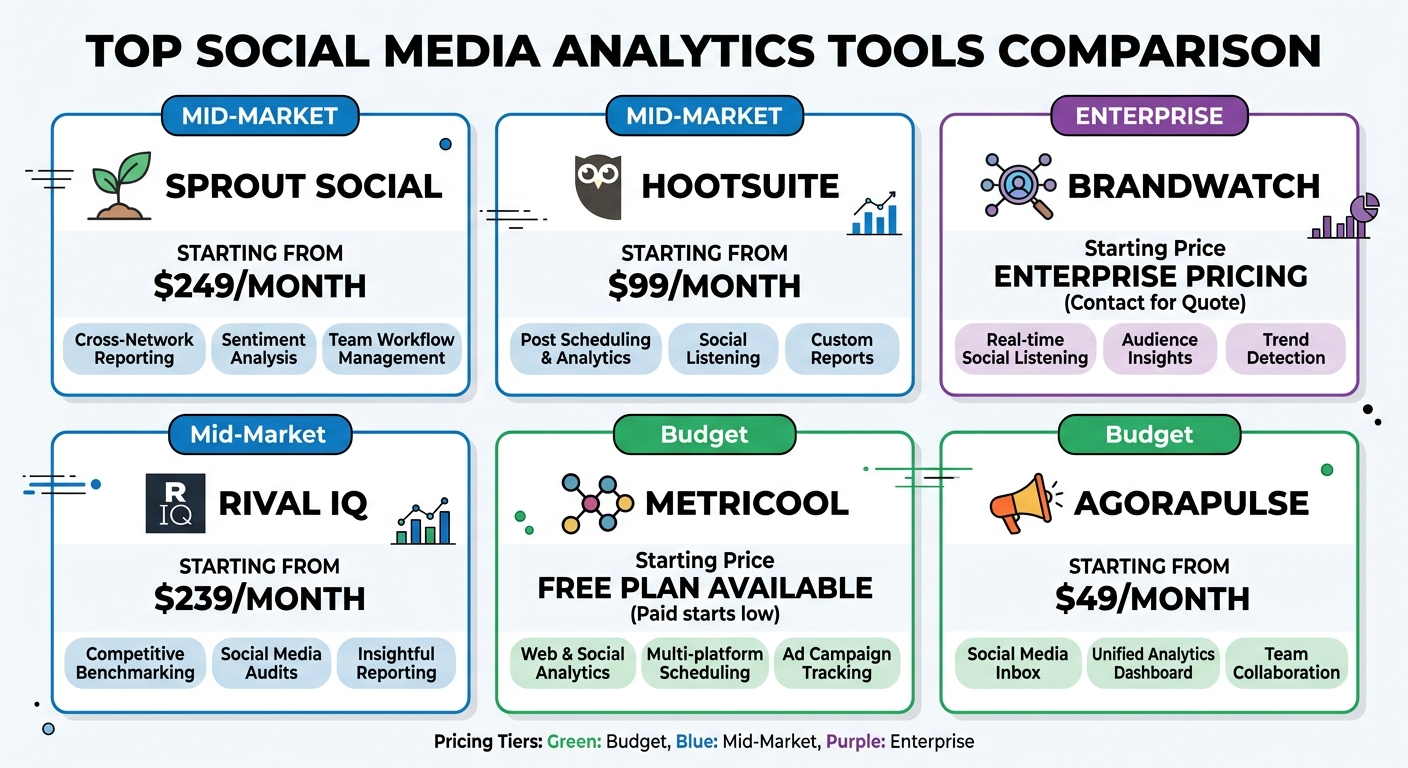
Sprout Social remains the gold standard for mid-market and enterprise teams. Its analytics suite covers post-level performance, audience demographics, competitor benchmarking, and premium listening features. It integrates with Salesforce, HubSpot, and Google Analytics 4, making it a strong choice for teams that need to tie social data to CRM activity. Plans start at $249/month — it’s powerful, but not budget-friendly for small teams.
Hootsuite is the most widely adopted social management and analytics platform globally, with over 18 million users. Its analytics dashboard covers paid and organic performance, custom report building, and team-level productivity tracking. It’s particularly strong for agencies managing multiple client accounts. Starting at $99/month, Hootsuite offers better entry-level pricing than Sprout Social.
Brandwatch leads on social listening and sentiment analysis. If competitor benchmarking and brand reputation monitoring are priorities, Brandwatch’s AI-driven listening engine is among the best available. Enterprise teams benefit from 10+ years of historical social data for trend analysis.
Rival IQ specializes in competitive analysis, letting you benchmark your performance directly against up to 20 competitors across engagement, posting frequency, and hashtag strategy. Starting at $239/month, it’s ideal for teams focused on competitive intelligence.
Metricool and Agorapulse are strong mid-tier options with clean dashboards, solid multi-platform support, and accessible pricing — both well-regarded on G2’s social media management category.
Cue bridges the gap between scheduling and analytics on Growth plans and above, giving creators and small teams a unified dashboard to schedule smarter and track what’s performing — without juggling multiple subscriptions.
Free Social Media Analytics Tools for Small Businesses
If you’re a small business owner or independent creator, you don’t need to spend hundreds of dollars per month to get meaningful data. Several high-quality free tools can get you started.
Native platform analytics are the obvious starting point. Instagram Insights, Facebook Insights, LinkedIn Analytics, and X/Twitter Analytics are all free with a business or creator account. They cover reach, impressions, follower demographics, and post-level performance. They’re limited to a single platform and don’t allow cross-channel comparison, but for focused strategies they’re genuinely useful.
Google Analytics 4 (GA4) is free and essential for tracking social traffic to your website. You can create custom reports to see which platforms are sending the most engaged visitors and which convert to leads or purchases.
Buffer’s free plan includes basic analytics for up to three channels — it’s a good entry point for creators who also need simple scheduling.
Metricool’s free tier supports one brand and includes 3 months of historical data, which is surprisingly generous for a zero-cost option.
For small businesses looking to build a sustainable social media presence, we recommend pairing one native analytics tool per platform with GA4 for website attribution.
Hootsuite vs Sprout Social: Analytics Head-to-Head
The Hootsuite vs Sprout Social debate is one of the most common questions in social media marketing — and when it comes specifically to analytics, the answer depends heavily on your team size and use case.
Hootsuite Analytics strengths:
- Best-in-class for paid + organic blended reporting
- Highly customizable dashboards
- Strong team performance reporting (useful for agencies and larger marketing departments)
- Integrates with Adobe Analytics and Google Analytics 4
- Starts at $99/month (Professional plan)
Sprout Social Analytics strengths:
- Superior audience demographic data and behavior insights
- More intuitive UX — teams tend to actually use it
- Excellent CRM integrations (Salesforce, HubSpot) for sales pipeline visibility
- Premium listening add-on for sentiment analysis and brand mentions
- Starts at $249/month with advanced features included
For pure analytics depth with enterprise integrations, Sprout Social edges ahead. For agencies that need robust multi-client reporting and paid social tracking, Hootsuite is often the better fit — offering 60% lower entry cost at $99/month versus $249/month. Both platforms require annual commitments at their best rates, so factor total cost of ownership into your decision — not just the monthly sticker price.
For teams that don’t need enterprise-tier features, tools like Agorapulse (starting at $49/month per user) or Metricool offer solid analytics at a fraction of the cost.
Platform-Specific Analytics: Instagram, TikTok, and LinkedIn
Not all platforms report the same metrics, and a one-size-fits-all analytics approach misses the nuance of how each network’s algorithm works.
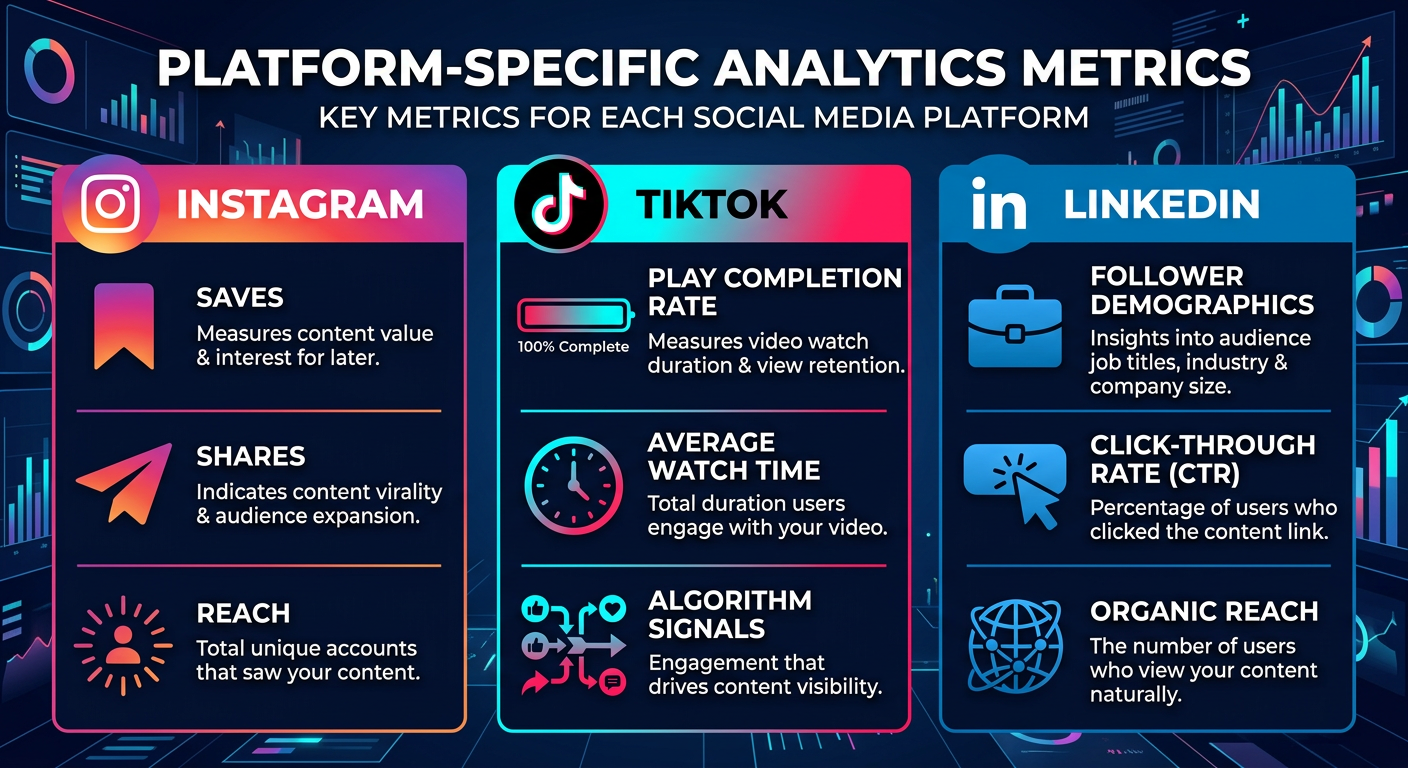
Instagram Analytics: The most important metrics on Instagram are saves, shares (via DMs), and reach from non-followers — all signals the algorithm uses to decide whether to push content wider. Native Instagram Insights tracks these, but tools like Sprout Social and Socialinsider provide richer trend data and hashtag performance breakdowns.
TikTok Analytics: TikTok’s native analytics are surprisingly robust for a free tool. The key metric unique to TikTok is video completion rate — how many viewers watch to the end. A completion rate above 50% is a strong signal to the algorithm. Watch time, follower growth from individual videos, and traffic source breakdown (For You page vs. Following) are also critical. Third-party tools like Keyhole and Metricool now support TikTok analytics integration.
LinkedIn Analytics: LinkedIn is a B2B platform, so the metrics that matter most are impressions from outside your immediate network (organic reach to cold audiences) and click-through rate on link posts. Follower demographics — job title, industry, seniority — are uniquely available on LinkedIn and valuable for B2B targeting. Hootsuite and Sprout Social both offer strong LinkedIn analytics coverage.
If you’re posting across all three platforms, knowing which metrics to prioritize per network is what separates surface-level reporting from genuinely actionable insight.
How to Measure Social Media ROI
Social media ROI is notoriously difficult to measure — but not impossible. The core formula is straightforward: (Revenue attributed to social – Cost of social) / Cost of social × 100 = ROI%.
The challenge is attribution. Most social media touchpoints are part of a longer buyer journey, not a direct last-click conversion. Here’s a practical framework for measuring ROI:
-
Set platform-specific goals. Not every platform drives direct sales. LinkedIn might generate leads; Instagram might drive brand awareness; X might support customer service. Define what success looks like per platform before measuring it.
-
Use UTM parameters on every link you post. These tags let GA4 track exactly which social posts drove website visits, sign-ups, or purchases. Without UTMs, social attribution in GA4 is incomplete.
-
Track assisted conversions, not just last-click. A user might discover you on Instagram, engage with a LinkedIn post a week later, and convert via email. Assisted conversion reporting in GA4 shows the full path.
-
Benchmark your cost per result. If you’re running paid social alongside organic, calculate cost per click (CPC) and cost per acquisition (CPA) for each platform and compare against channel benchmarks.
According to Hootsuite’s 2025 Social Trends Report, teams that formally measure social ROI are 1.6x more likely to receive increased marketing budgets the following year — a compelling reason to build measurement into your workflow from day one.
Analytics and Scheduling: The Workflow That Compounds Growth
The most effective social media strategies don’t treat analytics and scheduling as separate activities — they create a feedback loop between them. You publish, measure, learn, and adjust your next batch of content based on what the data tells you.
Here’s what that workflow looks like in practice:
- Batch create content based on your best-performing formats and topics.
- Schedule posts at optimal times informed by your analytics — not generic best-practice guides, but your actual audience’s engagement patterns. Tools like Cue analyze engagement patterns per platform to surface your personal peak times.
- Review performance weekly — not daily. Daily check-ins create noise; weekly reviews reveal trends.
- Identify your top three posts of the week by engagement rate or reach. What format were they? What topic? Use those signals to inform next week’s content plan.
- Adjust your content calendar accordingly — doubling down on what works and cutting what doesn’t.
Pairing analytics with a consistent publishing schedule is the compound interest of social media growth. Research shows that consistent posting with data-informed adjustments can drive 40-50% higher engagement rates month-over-month compared to sporadic posting without measurement. Integration matters here too. If your analytics tool connects directly to your scheduler, you eliminate the friction of toggling between platforms and can act on insights faster.
Pricing Comparison: What Tools Cost in 2026
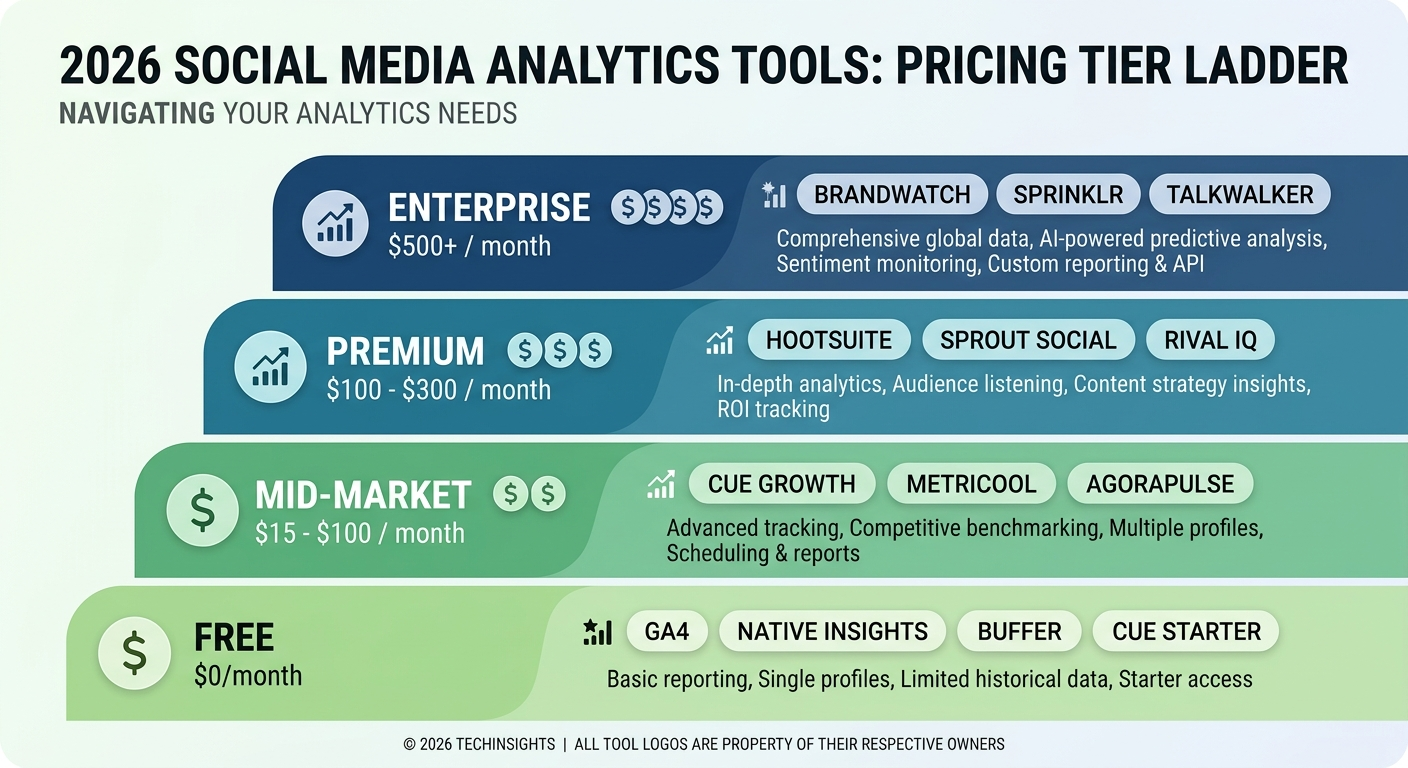
Understanding total cost of ownership is critical when evaluating social media analytics tools. Here’s a realistic breakdown of what you’ll pay across the major tiers in 2026:
Free tier options:
- Native platform analytics (Instagram, LinkedIn, TikTok, X): Free
- Google Analytics 4: Free
- Buffer (3 channels, basic analytics): Free
- Metricool (1 brand, 3 months history): Free
- Cue Starter plan (basic scheduling + analytics building blocks): Free
Mid-market tools ($15–$100/month):
- Cue Growth: $15/month (billed yearly) — analytics dashboard, 15 accounts, AI credits
- Metricool Premium: ~$22/month
- Agorapulse: from $49/month per user
- Keyhole: from $79/month
Premium platforms ($100–$300/month):
- Hootsuite Professional: from $99/month
- Sprout Social Standard: from $249/month
- Rival IQ: from $239/month
Enterprise ($500+/month or custom pricing):
- Brandwatch: custom pricing, typically $1,000+/month
- Sprinklr: custom enterprise contracts
- Talkwalker: custom pricing
For small businesses and independent creators, the sweet spot is a mid-tier tool that combines scheduling and analytics in one subscription — avoiding the cost and complexity of maintaining separate tools. For agencies and enterprises, the ROI of premium platforms can be justified when they directly inform paid media spend or client reporting.
When comparing prices, always check: how many social accounts are included, whether historical data is limited, and whether the features you actually need are on the base plan or locked behind expensive add-ons. Many teams overspend by 35-50% on analytics tools by paying for features they never use.
Building a Data-Driven Social Media Strategy
Analytics tools are only as valuable as the strategy they inform. A data-driven approach to social media means systematically testing hypotheses, measuring results, and iterating based on what the data reveals.
Start by defining 3-5 key performance indicators (KPIs) that align with your business goals. These might be follower growth rate, engagement rate, click-through rate, or conversion rate — depending on whether your goal is brand awareness, community building, or direct sales.
Once you’ve chosen your KPIs, establish baselines by reviewing your last 90 days of social data. This gives you a reference point to measure improvement against. Then, commit to testing one variable at a time: format (video vs. carousel), posting time, content topic, or call-to-action style. Keep everything else constant so you can isolate what actually drives results.
After 2-4 weeks of testing, review the data. If a variable improved your KPI by 15% or more, double down on it in your next content batch. If it showed no improvement, cut it and test something new. This iterative approach to content strategy is what separates high-growth social accounts from stagnant ones.
Advanced Analytics: Competitor Benchmarking and Sentiment Analysis
Once you’ve mastered basic analytics, advanced tools unlock competitive insights and deeper audience understanding.
Competitor benchmarking tools like Brandwatch and Rival IQ let you compare your engagement rate, posting frequency, and follower growth directly against competitors. If your Instagram engagement rate is 0.40% but competitors average 1.2%, that signals opportunity to improve your content or posting strategy.
Sentiment analysis uses AI to analyze whether mentions of your brand are positive, negative, or neutral. This is especially valuable for brand reputation monitoring and customer service teams. Sprout Social’s listening features include sentiment scoring, allowing marketing teams to track brand perception changes over time.
Hashtag analytics show which hashtags drive the most reach and engagement for your account specifically. Generic hashtag guides suggest #marketing or #socialmedia, but data-driven marketers analyze their own hashtag performance and double down on tags that drive results in their niche.
These advanced features typically require premium platform subscriptions ($200+/month), but for competitive industries or high-growth teams, the ROI often justifies the cost. A 20-30% improvement in engagement rate from competitive insight can translate to millions of dollars in additional revenue for mid-market brands.
Frequently Asked Questions
What is the best free social media analytics tool?
For most users, Google Analytics 4 combined with native platform analytics (Instagram Insights, LinkedIn Analytics, TikTok Analytics) provides a strong free foundation. Metricool’s free tier also supports one brand with 3 months of historical data at no cost, making it an excellent option for small businesses starting their analytics journey.
How do I measure social media ROI?
Use UTM parameters on every link you post so Google Analytics 4 can attribute website traffic and conversions back to specific posts. Combine that with assisted conversion reporting to see the full multi-touch journey, and calculate (Revenue from social – Cost of social) / Cost of social × 100 for your ROI percentage. Teams that formally measure social ROI are 1.6x more likely to receive increased marketing budgets.
What metrics should I track for social media engagement?
Focus on engagement rate (interactions divided by reach), saves and shares (which signal algorithmic amplification), follower growth rate, and click-through rate on link posts. Avoid over-indexing on vanity metrics like raw follower counts or total impressions. Industry benchmarks show Instagram engagement averages 0.70% while LinkedIn typically sees 0.35–0.50%.
Which is better for analytics — Hootsuite or Sprout Social?
Sprout Social offers superior audience demographic data and CRM integrations, making it better for teams that need to tie social performance to sales pipelines. However, Hootsuite is stronger for blended paid and organic reporting and multi-client agency workflows, while costing 60% less at entry-level ($99/month vs $249/month).
Do I need a separate analytics tool if I already use a scheduling platform?
Not necessarily. Many modern scheduling platforms like Cue include built-in analytics dashboards on paid plans, which can cover most small business and creator needs without adding a separate subscription. Dedicated analytics tools become worth the cost when you need competitive benchmarking, advanced listening, or enterprise CRM integration.
What is the difference between reach and impressions in social media analytics?
Reach tells you how many unique accounts saw your content, while impressions count total views including repeat views from the same person. A high impression-to-reach ratio signals strong content recall and indicates your audience is engaging with your content multiple times, which is a positive signal for platform algorithms.
Let Cue handle the scheduling
AI picks the best times for your audience and auto-publishes across every platform.